


Cat Tiles: Cute Piano Game
4.597.00 Reviews
App Specs
- Version
- 2.4.3
- Updated On
- License
- Free
- Downloads
- 10,000,000+
- Developer
- WingsMob
- Categories
- Music
- Platform
- Android, iOS
Screenshots
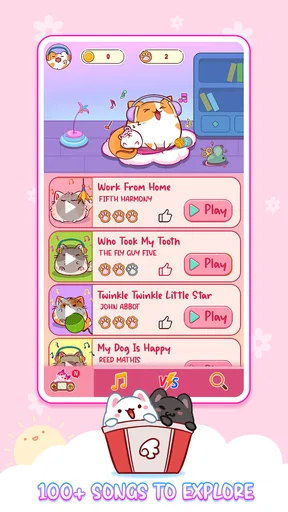
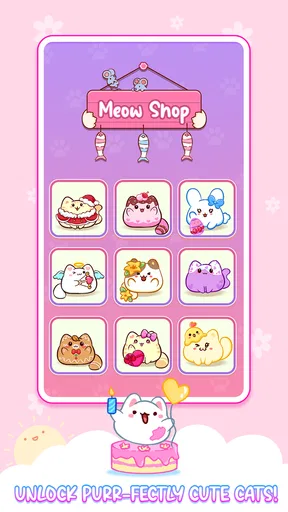
 Analysis by AppCompare
When I want a quick music game that asks for attention without demanding a long session, Cat Tiles: Cute Piano Game is an easy one to understand. Its appeal is the mix of piano-tile tapping and cat-themed presentation: you follow the tiles, listen for the rhythm, and try to stay accurate as the pace rises. It is a light, approachable idea, though its simplicity also means it suits casual play better than serious music practice.
Finding a comfortable rhythm
The basic loop is easy to learn, so I can get started without studying a complicated ruleset. The useful distinction is between tapping quickly and tapping deliberately. When the screen gets busier, rushing can make a run fall apart; I get more out of keeping my attention on the next tile and letting the rhythm guide my timing. That makes the game approachable for a short break, but still gives me something to focus on.
For a first session, I’d treat the early play as a warm-up rather than a high-score attempt. It gives you time to get used to the tile movement and the way the music and taps fit together. Once that feels natural, repeating a section or level can help you notice where you tend to lose your timing. This is a practical habit, not a shortcut: the game still asks you to react in the moment.
Settings and small choices that matter
Before settling in, I would check the available sound and control options rather than assume the default setup is ideal. Music games depend on timing and attention, and the right volume for a quiet room may not work on a busy commute. If you play somewhere noisy, keeping the device’s sound at a comfortable level and focusing visually on the tiles can make the session less distracting. If you are playing around other people, lowering the volume is a simple courtesy.
The cat characters add personality, but I would treat customization as a pleasant extra rather than a gameplay advantage. Choosing a character you like can make repeated sessions feel more personal; it does not replace careful timing. I also wouldn’t assume that changing a visual choice will make a difficult pattern easier. If a run feels demanding, a calmer setting and a less distracted environment are more useful adjustments.
Building a repeatable practice habit
One way I’d use the game is in short, focused attempts: play a level, notice whether missed taps happen when the tempo changes or when attention drifts, then try again with that specific point in mind. That gives each replay a purpose instead of turning every attempt into an undirected chase for a better score. It is especially handy when I have a few spare minutes and want an activity that feels more engaging than scrolling.
For example, on a break between errands, I might play one short session with the sound on, then stop rather than keep tapping while distracted. If I want to play again later, I can return with fresh attention. That routine is more reliable than trying to improve while carrying on a conversation or watching something else at the same time. Because the game’s central challenge is visual timing, divided attention can quickly become the real obstacle.
Worth Reading Before You Choose

Switching to Android Auto Means Rethinking Your Driving Routine

Google Calendar Makes a Crowded Week Easier to Manage

Baby Panda World Brings Quick Play to Modern Phones, but Its Game Library Feels Busy

ESPN’s Live Game View Makes Following Close Games Easier

QuizzLand Review: A Good Fit for Short Trivia Breaks, Not Every Player

Basketball Stars: Multiplayer Is Fast, but Can It Recover When Matches Go Wrong?
It also helps to separate enjoyment from improvement. If I’m playing to relax, I can accept an imperfect run and enjoy the cats and music. If I’m trying to improve, I can pay closer attention to the transitions where my timing slips. Those are different goals, and switching between them makes the experience feel less frustrating.
Where it fits among music games
Compared with rhythm games built around elaborate song charts or instrument-like controls, this is a simpler, more immediate kind of play. That makes it easier to pick up when I don’t want to learn a complex system. On the other hand, anyone looking for detailed rhythm analysis, a serious practice tool, or a deep competitive music game may prefer an option designed around those goals. Cute presentation and quick tile tapping are the point here, not musical instruction.
It is also different from listening to a playlist: I have to watch and respond, so it works better when I can give the screen my attention. I wouldn’t choose it as background entertainment while working or walking through a crowded place. At home during a short pause, though, the simple structure makes it a convenient way to add a little interaction to listening.
The game is developed by WingsMob and is free to play. Its average rating is 4.5 from around 22,000 ratings, and it has been installed over 10 million times. Those figures suggest broad interest, but they don’t tell me whether the pace or presentation will suit a particular player. I’d use the short, clear gameplay loop as the better guide: it is most appealing if you like rhythm challenges with a playful cat theme.
Knowing when the challenge stops being fun
The same straightforward design that makes the game easy to start can feel limiting if you want a lot of strategic depth. Once the basic tapping pattern is familiar, the main test is your consistency as the pace increases. That is satisfying in small doses, but players who want a large range of mechanics or a strong sense of musical progression may find the loop repetitive.
There is also a practical trade-off in playing on a small screen: the action is concentrated in quick visual decisions, and a cramped or uncomfortable grip can make those decisions harder. I’d hold the device in a way that keeps the tiles visible and my tapping hand relaxed, especially during longer attempts. If my fingers are covering the area I need to watch, or I’m playing while moving around, it is a good time to pause.
For younger players, the Everyone age rating makes the game broadly suitable, and its basic interaction is easy to grasp. I would still keep the volume and session length sensible, as with any game on a shared device. For adults, the appeal is less about mastering a complicated system and more about a cheerful, low-commitment challenge that can fit into a spare moment.
Who will enjoy it—and who may want another game
I’d recommend it to someone who likes cats, enjoys tapping along to music, and wants a game that can be understood quickly. It can work well as a small break, a casual shared activity where players take turns, or a light challenge for a child with an adult nearby. The combination is specific: the cat visuals soften a familiar tile-tapping format without changing it into a full music-learning experience.
I’d skip it if your main goal is to learn piano, read notation, or practise a real instrument. The game’s taps are a rhythm challenge, not a substitute for lessons. I’d also look elsewhere if you prefer long-form progression or complex song arrangements. A more involved rhythm game may offer greater depth, while a music-learning app is a better fit for structured practice.
One useful expectation to set is that “music game” can mean very different things. Here, I would come for an active, quick-response pastime rather than a catalogue to browse like a streaming service or a lesson plan. If that distinction matches what you want, the game’s modest scope becomes a strength: there is little to learn before you can simply play.
Gameplay: A Purr-fectly Fun Experience
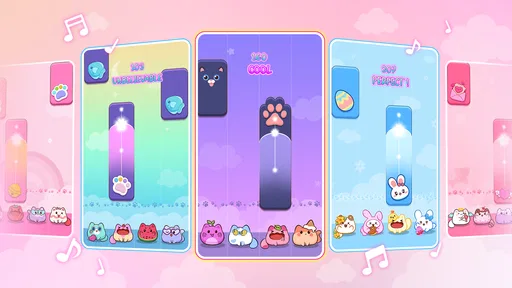
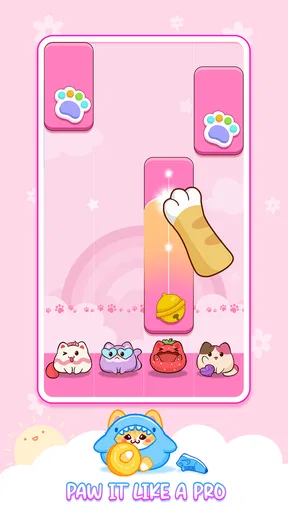
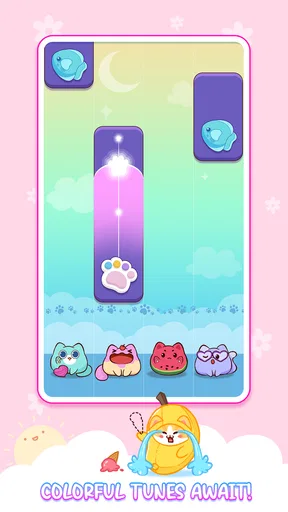
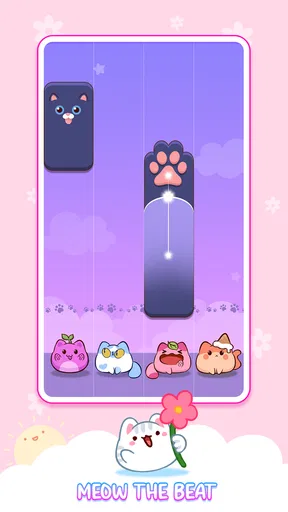
So, what's the deal with Cat Tiles: Cute Piano Game? Imagine the traditional piano tile game, but sprinkle in some adorable cats that dance along to the rhythm. The concept is straightforward: tap on the black tiles as they appear on the screen and avoid the white ones. Simple, right? But here's where it gets interesting. As you progress, the pace picks up, and those cute little cats start pulling off some impressive moves.
The game features a variety of levels that increase in difficulty, and each one is set to a catchy tune. The music selection is surprisingly diverse, ranging from classical pieces to contemporary hits. It’s like having a tiny orchestra of felines in your pocket!
Graphics and Sound: A Visual and Auditory Delight
Now, let’s talk about the graphics. The design is incredibly charming, with vibrant colors and lovable cat animations that make the game visually appealing. Each cat has its own personality, and watching them groove to the beat is enough to bring a smile to anyone's face.
The sound quality is top-notch, which is crucial for a music-based game. The tunes are crisp and clear, allowing you to fully immerse yourself in the gameplay. Plus, the sound of the tiles being tapped is oddly satisfying, adding to the overall experience.
User Interface: Smooth and Intuitive
The user interface is clean and intuitive, making it easy for anyone to pick up and play. The layout is straightforward, with all the necessary options easily accessible. Whether you want to change the music, explore new levels, or just check out your high scores, everything is just a tap away.
One of the features I appreciate the most is the customization option. You can choose different cat characters and even unlock new ones as you advance. It’s a nice touch that adds a layer of personalization to the game.
Replayability: Keeps You Coming Back for More
One of the standout features of this game is its replayability. With a plethora of levels and music tracks, you’ll find yourself coming back time and again. Each level offers a new challenge, and the desire to beat your previous high score is a strong motivator.
Plus, there are regular updates with new songs and cats, keeping the content fresh and exciting. It ensures that you never get bored, and there’s always something new to explore.
On top of that, the game has a competitive edge with leaderboards where you can compete with friends or players worldwide. It’s a great way to show off your skills and add a bit of friendly competition to the mix.
“Cat Tiles: Cute Piano Game is more than just a game; it’s a delightful escape into a world of music and cuteness.”
Final Thoughts: A Must-Try for Music and Cat Lovers
In conclusion, Cat Tiles: Cute Piano Game is a delightful and addictive game that combines music, cuteness, and a bit of challenge into one charming package. Whether you're looking to kill some time or just want to enjoy some relaxing tunes with adorable visuals, this app has got you covered.
It’s perfect for all ages, whether you’re a kid looking for fun or an adult needing a lighthearted distraction. So, if you haven’t tried it yet, give it a go. You might just find your new favorite game, and trust me, those dancing cats are hard to resist!
A sensible final check before installing
The game is listed as free, with an Everyone content rating. It was released on October 27, 2023, and version 2.2.11 is the current version. It requires Android 7.1 or later, so I would check device compatibility before installing if I’m using an older phone or tablet. These basics make it easier to decide whether it fits the device and the person who will be playing.
For me, the strongest reason to try it is the combination of a familiar piano-tile challenge with a distinct cat-themed look. The main caution is just as clear: it remains a reflex game, so its appeal depends on whether repeated tapping and rising pace sound enjoyable. If you want a friendly little music challenge rather than a lesson or a deep rhythm system, it is an easy one to consider.
Pros
- Adorable graphics and animations.
- Simple
- intuitive controls.
- Regular updates with new songs.
- Challenging yet rewarding gameplay.
- Supports offline play.
Cons
- Limited song selection in free version.
- Ads can be intrusive at times.
- Requires constant internet for updates.
- In-app purchases can be expensive.
- Repetitive gameplay after a while.
FAQs for Cat Tiles: Cute Piano Game
What is the main objective of Cat Tiles: Cute Piano Game?
Cat Tiles: Cute Piano Game is a rhythm-based mobile game where players tap on piano tiles to create music. The primary goal is to hit the tiles in time with the music, helping cute cat characters navigate through various musical challenges. It's designed to be both entertaining and a way to improve your sense of rhythm.
Is Cat Tiles: Cute Piano Game suitable for all ages?
Yes, Cat Tiles: Cute Piano Game is designed to be family-friendly and suitable for all ages. The cute graphics and easy-to-understand gameplay make it accessible for children, while the increasing difficulty levels provide a challenge for adults. It’s a great game for both casual players and rhythm game enthusiasts.
Does Cat Tiles: Cute Piano Game require an internet connection?
Cat Tiles: Cute Piano Game can be played offline, which means you don’t need an internet connection to enjoy the basic gameplay. However, an internet connection might be required for downloading additional content, such as new songs or updates, and for in-app purchases if you choose to enhance your gaming experience further.
Are there any in-app purchases in Cat Tiles: Cute Piano Game?
Yes, Cat Tiles: Cute Piano Game offers in-app purchases. Players can buy items like new songs, cat characters, or aesthetic upgrades. While the game is free to download and play, these optional purchases can enhance the experience and support the developers. However, it’s entirely possible to enjoy the game without spending money.
How does the game handle data privacy and user information?
Cat Tiles: Cute Piano Game takes data privacy seriously and complies with standard data protection regulations. The app may collect data for improving user experience, but it typically does not share personal information without consent. Users are encouraged to review the privacy policy within the app for detailed information on data handling and opt-out options.


